Showing posts with label ESL. Show all posts

Wednesday, September 3, 2014

Google Forms Update!

FINALLY, you can customize your own Forms theme.  If you are like me, you are bored with the standard themes for Forms, well...Google is finally allowing you to customize your own theme.  Here's how it's done. In Forms, select the 'change theme' option and in the list of themes on the right of your screen go to the 'in this form' theme and select the customize option underneath.  Then, in the header image, select 'choose image...'  You can go the bottom of the insert image box and choose to upload, take from your albums, or select from your Google Drive.

Don't want to customize? You can select from Google's new list of 23 cool themes as well. Many of these new themes even contain gifs for those who want motion in their themes. Well, there it is guys.  Try it yourself and see how many cool forms you can create.

Best,
#mr.ford

Thursday, August 14, 2014

ADD-ON ALERT!! SUPER QUIZ!

If you are a fan of Flubaroo you have to check out Google's latest Add-On, Super Quiz! Oli Trussel O Trussell - Google+ is the creator of what many educators are calling Flubaroo on steriods! So what makes Super Quiz overshadow Flubaroo? Well, other than a more intense version of student feedback and teacher analyzation, Super Quiz boasts a self grading script like Flubaroo that automatically grades submissions immediately after they are electronically submitted without updating the instructor.  This means that late submissions are graded without the teacher having to manually activate the self grading script.  Perhaps the best part of Super Quiz is that it features a triggered mail merge option for immediate student feedback.  This particular feature has been unavailable in Google's new spreadsheets and has been a hold up for developers like Andrew Stillman-creator of Autocrat, G-Class folders and Doctopus; whose Add-Ons rely heavily on mail merge. Mail merge combines information from a spreadsheet with a pre created document to mass produce and personalize submission results.

Super Quiz is available as an Add-On Google in Sheets and is easy to install and the creator is readily available to answer questions and updates on Google+. To find out more and check out a video, click on the Google+ link above!

Best,
#mrford#techsavvyteacher


Monday, May 26, 2014

SCRIPT ALERT!! formLimiter!

One of my favorite little scripts is formLimiter.  Have you ever given a Google Form quiz or test and ended up screaming at your students who refuse to turn in the damn thing at the end of class because they want more time? Have you ever sent a link of that Form to a student who missed the quiz/test and it takes them two weeks to a month before their responses end up in your spreadsheet because the student knew there would be no time limit to handing it in?  Have you ever used Flubaroo to batch grade an assignment only to have that one student tell you they just handed it in after you have already sent student scores back?  The reinforcement of deadlines in a Google Forms can be ever annoying. Well, with formLimiter, reinforcement of submission deadlines just got real.

Unlike most scripts, formLimiter is easy to set up for beginners in script using. It is pretty straight forward. After you install the script, select how you want to limit the responses to the form by time limit, total number of responese or spreadsheet cell value.   For me the time limit is most useful. I can select a date and time to set for deadline submission.  After set, the form will no longer accept submissions.  This is great mostly because it will train students to respect deadline submission time and allow the teacher to stay better organized.  You can even send a notification to editors when the time limit is reached.  For more on formLimiter or more scripts in Google Forms, check out http://cloudlab.newvisions.org/

Best,
#mrford#techsavvyteacher

Wednesday, April 16, 2014

3 Ways To Use Google Forms in Your BYOD ESL Classroom

3 Ways To Use Google Forms in Your ESL Classroom
  • Tests/Quizzes
  • Surveys
  • Progress Check-Ins
Tests and quizzes. Google Forms is the easiest way to create online tests/quizzes for your BYOD or m-learning classroom. Choose from many colourful backgrounds and after naming your form, start creating right away.  Originally designed for surveys, using Google Forms as a test/quiz creator allows you to input videos, images, headers, and page breaks to make your form more interactive for your students.

Surveys.  Surveys are a great way to conduct peer evaluations on BYODs. Google forms lets you easily create evaluation surveys that are perfect for Public Speaking or Presentation classes.  Share the survey link via G mail or cross platform sharing apps like Whatsapp.  Surveys for peer evaluations allows students the power to critique their classmates and give valuable feedback.

Progress Check-Ins.  Using Google Forms to create survey Progress Check-Ins helps the teacher stay updated on the progress of student essays, presentations, or term papers.  Google Forms lets teachers create some pretty cool and personalized progress check-in forms that can easily be shared ans collected by Google.

Best,
#mrford#techsavvyteacher

Sunday, April 6, 2014

Techsavvy Tips for BYOD (Bring Your Own Device)

There are literally hundreds of articles about BYOD in the classroom, so I thought I'd throw my hat in the ring and share my experiences with you. As a paperless educator, BYODs are the common core for my flipped ESL classrooms as they are already common use and practice in the business world both domestic and foreign.  Employees of big companies and adult learners carry their personal devices into the boardroom and the classroom.  BYODs were first shunned from big companies and businesses for the obvious lack of control and security issues, but as more and more companies are taking advantage of secured cloud storage; school systems public and private are beginning to accept the idea that students can be responsible for their own devices and conduct in the classroom. Though the most popular BYOD is the smart phone, laptops and even the handheld gaming console are also popular BYOD devices.

I first employed BYOD when I was expected to deliver quality ESL material to a large group of students with very little or no technology.  During my interview with my first ESL company, they boasted to me about their use of technology in their classrooms. They even showed me a room with a whiteboard and overhead projector; only to find out that was their ONLY room with a whiteboard and projector and you had to reserve the room a week in advance.  I also got tired of standing in long lines to use the crowded copy machine or have my printed documents disappear into thin air after I sent them to the printer.

Though I have successfully managed to flip my classroom by way of BYOD, it doesn't mean that I haven't been met with obstacles along the way.  I have been met with resistance by both administration and my own students when I first implemented using smart phones in class.  I had challenges trying to share information to all students with different devices.  Poor Internet connection always ruined my day. And you can only imagine how I felt when a student just forgot to bring their device to class.  

So if you are thinking about starting your own BYOD classroom, or already have started yours, here are a few tips I would like to share with you from my experience.


  1. Slowly impliment BYOD into class. Sure, your excited  about BYOD, but not everyone else is. You'll be suprised to see how your  admin, co workers, and students will show resistance towards BYOD.   You'll definatly want to be ready to answer a bunch of questions and face criticisms. Your best bet is to create a policy for BYOD in your classroom, register your students for a Google account if they don't already have one, and create a classroom circle for your students in your Google Hangouts account for sharing.  
  2. Create your own BYOD policy for your classroom. I'm very liberal with the use of BYOD in my classrooms, but establishing a policy for using BYOD, like a class syllabus, makes it clear and cut what is expected/tolerated of the students use of BYOD. If you don't already have one of your own, here is a link to a nice list of sample BYOD policies. 11 Sample Education BYOT Policies To Help You Create Your Own
  3. Use cross platform sharing applications. Cross platforms are ideal for sharing links, documents, audios, videos, and messaging. Apps for phones like Viber, Tango and Whatsapp are popular with smart phones, but not compatible with many pads, notebooks, and laptops.  Your best bet is to utilize Google. Not only is its messaging system, "Hangouts" available on Apple and Android products, you do not require your student's personal phone number to register. You simply use their Gmail address.
  4. Take advantage of cloud storage accounts. Once again, Google folks! Cloud storage systems like Google (Drive) and Dropbox allow your students to pull their work from any device and free themselves of hefty laptops and those easy to lose jump drives.  
  5. Don't be afraid to use social media. Social media outlets like FB, Twitter, YouTube, Blogger, and Glide are great tools for creative assignments and finding resources outside of the box. Use blogs as a place to display student writings.  Share or make YouTube videos to help students understand grammar points,  Have your students create a survey with their FB friends. Use Glide for a one-on-one video debate. Use Google Hangouts for a video conversation and then make it a YouTube video on your YouTube page. There are so many ways you can use Social Media in your BYOD classroom. Get creative. Here's a link to my current class blog via Blogger.  EF Atlanta B2.1
  6. Be ready for things to go wrong. With technology, things WILL go wrong. Sometimes,  emails won't get delivered. Some devices just won't be compatible no matter what you do.  Internet connection will be slow. And yes, some of your students will spend more time on their own social media sites rather than their classwork. Be prepared by using alternative resources, and if worse comes to worse, there's nothing wrong with making paper copies of resources before class starts if you can foresee the problem ahead of time. 
  7. Be consistent.  Start with one aspect of BYOD and stick with it.  The worst thing you can do to your class is start them out with the idea of BYOD and then two weeks later, bring them back to paper and pencil.  Pace yourself and stay consistent. You as the instructor are their key to success. No computer, smart phone, or Mobile device can replace the leadership of an instructor.
Best,
#mrford#techsavvyteacher


Tuesday, April 30, 2013

APP ALERT!! ESL PODCAST


     Are you a student looking for a great way to enhance your ESL/EFL listening skills? Are you an ESL Instructor who needs a quick listening activity to fill that missing gap in your syllabus? Check out my good friends Dr. Jeff and Dr. Lucy out in LA. ESL Podcast is the leader in podcasting for ESL/EFL students and instructors. Their podcasts are among the most popular and readily available online and on NOW your smart phone! 


     A lot of people are unfamiliar with podcasting.  Podcasting is basically a recorded dialogue that is intended to help enhance listening and reading comprehension skills.  They rely on a large variety of topics and many of these podcasts contain videos. A short quiz is usually given or listeners are asked to write a brief summary following the listening to test their comprehension. 

     I currently use this app in my Level 5 course at my institute as an instructor.  After playing the podcast via my phone and speakers, I ususally distibute a self generated worksheet that asks seven to ten questions and a brief summary of the listening.  I also request that my students download the app so that they can read along the second time the podcast is played for revision.

     Go to your Google Play Store and download the app today.  Let me know how it works for you.


Best,
#mr.ford

Sunday, April 21, 2013

Do I need a Social Security number to apply for a driver’s license while studying in the U.S.?


     No. You do not have to have a social security number to obtain a driver’s license in the U.S. The U.S. Government does not issue Social Security numbers solely for F-1 students to obtain a driver's license or a service that requires a credit check.  A Social Security number is for individuals who are working and need it for work purposes, to collect social security benefits or apply for certain government services.
     As an F-1 Visa student you are not permitted to work in the U.S. therefore; unless you are granted special permission to work or need a social security number for no work related purposes, you may not obtain one.  Social Security numbers are often requested as a form of identification by some organizations and some states now do require that you have one to obtain a driving license. 

     If the state you live in does in fact require you to have a Social Security number to obtain a driver's license, then go to your local Social Security Administration and apply for a Social Security number. If you are refused a social security number, you may be issued a SSA-L676, "Refusal to Process SSN Application." Your SSA-L676 is accepted by your local DMV if you do not possess a social security number. 
     Some states may issue you a 'temporary' license, but that is solely up to the state. In addition, you might have to wait to receive your license or have it mailed to your address. Note that you should wait at least 10 business days after your arrival to the United States before applying for a driver's license so that DHS has had adequate time to process your status.   For more information check out ssa.gov. 

     Best,
     #mr.ford


     List of documents that F-1 Visa students need to take with them to the DMV when applying for a driver's license:
•All signed versions of your Form I-20.

•Your current Form I-94

•A valid passport with visa (You do not need a visa if you are from a visa-exempt country, such as Canada or Bermuda).

•Proof of residence. This varies from state to state and might be a bill or a letter addressed to you.

•If your state requires it, an SSN card or a Form SSA-L676

•If you are on optional practical training, bring your Form I-766, “Employment Authorization Document”. The DMV will use the A number on this card to verify your status


Saturday, April 13, 2013

Saturday's Atlanta Arab Festival was a BLAST!


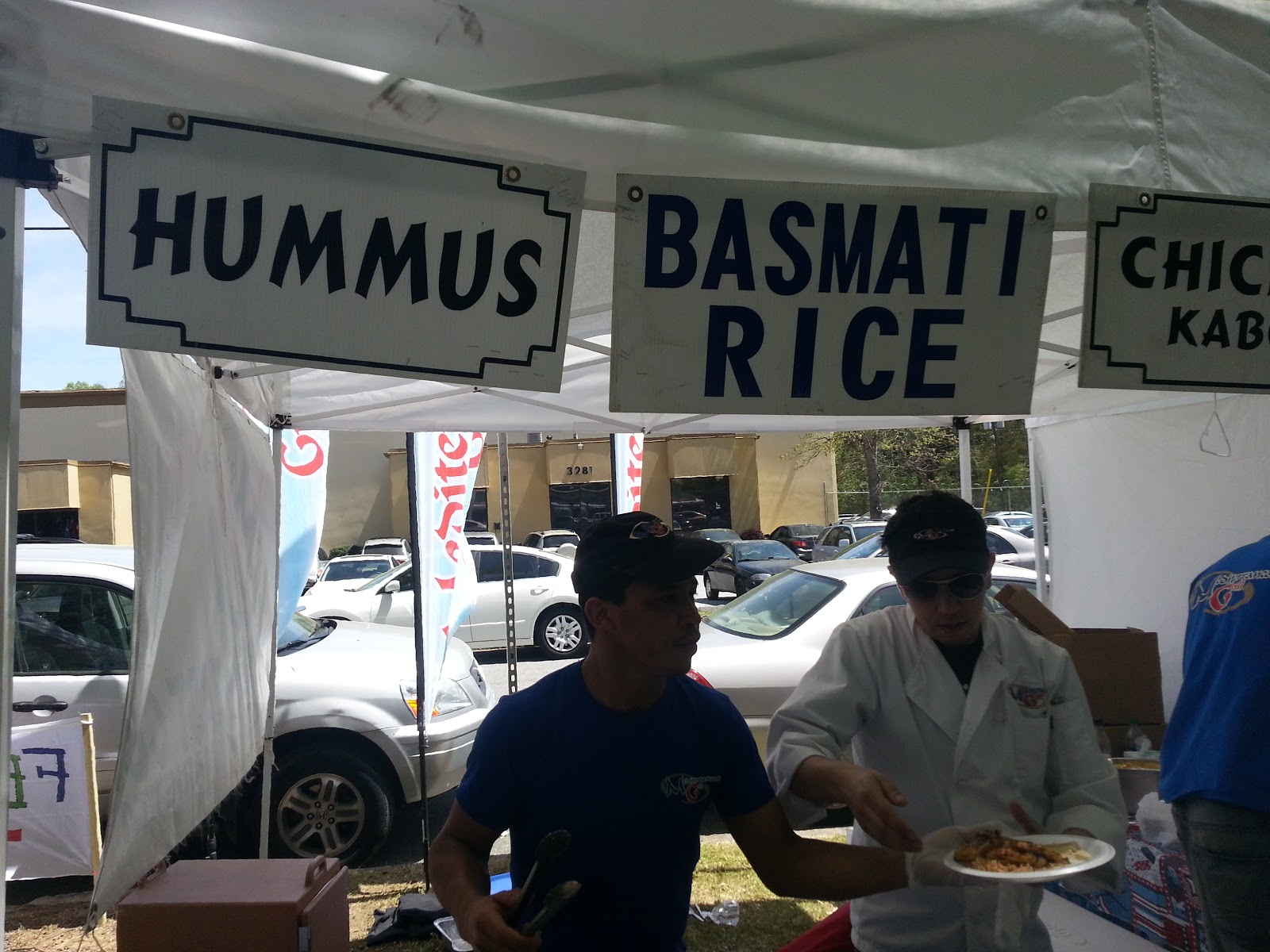
    This Saturday's 8th Annual Atlanta Arab Festival was a BLAST! I can't tell you how much I enjoyed myself.  I got a chance to enjoy some deeelicious food, a live concert, group dance, and conversation with members of the local Arab Community at Atlanta's Alif Institute.  I missed the Opening Flag Ceremony, but was just in time to listen to a little Oud Music and get my hands on some gyros, grilled chicken, pita bread and hummus dressing from Mediterranean Grill of Decatur, GA.  If you have never eaten at Mediterranean Grill, you have got to do yourself a favor and swing by one of their three Atlanta locations and thank me later.


    Moving on, the costume fashion show was very fun to watch.  There was no male clothing fashion, but the Arabic female clothing fashion models were very beautiful if I might say ;)! As the day went on, I ran across coworkers, students, FB friends, close friends I invited, and people who were in general very nice to me.  The live dance was exciting too. If you know me, you know I'll get a party started out of nowhere, so when someone gestured me to join in a circle dance, I didn't hesitate a second brothers and sisters. I jumped in with my friends and students trying to hold me back by the shoulders. "Mr. Ford come back--" they screamed. LOL.  Soon I was holding other peoples' hands and had Arabic rhythm under my feet.  Everybody was laughing and smiling as we all moved to the right in a big circle.  And just as I turned my neck to see where my 'crew' was, I had those same fools that were holding me back earlier dancing and clapping their hands too. It was Awesome, I did however have one moment where I suffered a little bit of a culture clash...

    I had brought my Saudi Arabian flag with me to the festival and kept it in my back pocket. During an intermission of one of the performances, I pulled my Saudi flag out of my pocket and waved it in the air. My students ran up to me and asked to take photos with it. Soon, I had like 12 people wanting to take a picture with the flag.  One person was a nice older Arabic lady who spoke no English.  She took the flag from me and gave me her phone to take a picture. After two snaps, a younger man who I assumed to be her son or nephew asked me in English to take a picture of him, the flag, and the old lady. After I snapped the photo with his phone I gave it back to him and he thanked me and gave me a hug. Cool. As I turn and give the old woman her phone, I reach out for a hand shake and she QUICKLY drew her hand from me and crossed her arms. For small second I felt embarrassed and looked down at the ground as if I was going to slam my head in the concrete and bury it there. I had forgotten that Arabic women are not permitted to touch men who are not family members. I apologized to both of them and told the English speaking sir that I meant no disrespect at all. He said Ok. I apologized to the gentleman again and told him that I was just one of those silly Americans who loves to go around hugging everybody he comes across when he's having a good time. He told me not to worry and that there was no harm done. Then he said, "Here," reaching out and giving me another hug. "I give you another one since you like hug so much." :)


     The market this year was much bigger than last year's and it was great to see some local ESL Institutes with their booths recruiting students.  BBT had a nice presence and so did Coca-Cola. There were all kinds of cloth, jewelry, oils, and artwork to buy from friendly faces. Henna and face painting were available for the kids. There was also a pony ride, moonwalker and two big plastic bubbles that were more or less oversized inflatable hamster wheels.    


    As the evening wined down and the white tents in the market started to fall apart, I took a tour of the inside of Alif Institute and took some photos of my favorite room inside the learning center. It's a shame that I only come here once a year I thought to myself. The volunteer tour guide was very friendly and permitted me to take photos so long as I didn't ask her to be in one. Inside there was everything from brass and wood cooking instruments to little dolls dressed in very rich and detailed clothing. 
  
    Around 6:20 in the evening, I finally called it quits and made my way to the parking lot with a couple of free t-shirts and other goodies.  A couple of people asked me if I would be back the next day and I told them that if I wasn't, then I would definetly return next year. 

    As I close, after 5 and half hours at the festival, I spent a total of $10; that includes the $2 admission fee. I also LOST $20 in change at the festival and it was found and returned to me 4 hours after I reported it missing.

     If you are ever in the International Village area of Atlanta and have a chance, swing by the Alif Institute and tell them #mr.ford sent you!

  Best,
#mr.ford

Alif Institute
3288 Marjan Drive
Atlanta, GA 30340
(770) 936-8770
www.alifinstitute.org
http://www.alifinstitute.org
Like them on Facebook:
ALIF Institute


Thursday, April 11, 2013

Officials at ESL School in Duluth, GA Indicted on Issuing Fraudulent Student Visas!

College Prep Academy in Duluth, GA has been shut down by U.S. Government Thursday.

    News broke out today in Duluth, Georgia that a local ESL Institute was indicted on immigration fraud.   Some female students were even used as prostitutes in local bars and never attended classes.

    Dong Seok Yi and members of his academic and administrative staff were indicted early March this year and again on April 2,. They were charged with abusing the student visa program as a front to cashing in on bringing immigrants here to work in local bars to supposedly work as staff and even prostitutes.   The owner of the Korean Times, a local newspaper in Atlanta, Dong Seok Yi was granted approval in 2009 to enroll foreign born students and issue I-20 visas that permit them to remain legal in the United States as long as they are enrolled in school.

    The school's academic coordinator and D.S.O. (designated school official), Soon An Kil, certified the Student and Exchange Visitor Information System, a computer system set-up by the Department of Homeland Security, that College Prep Academy's students were actively attending regular scheduled courses of 18 hours a week.


   Yi also allegedly worked with Korean bar owners to enroll females into the school with the knowledge that the females would not attend any classes, but work instead as prostitutes inside the bars.  College Prep Academy apparently issued these supposed students false I-20s with false financial information.

   Of the schools 100 student enrolled body, sources claim that only half of those students were attending classes and working illegally in the state of Georgia.  Charging ridiculous and sky rising fees for students who were not involved in the alleged prostitution rink, Yi was pocketing well over $150,000 a year.

    I will keep everyone posted as the story develops.

Best,
#mr.ford

Wednesday, April 10, 2013

VETO SB-160 in Georgia!

Tonna Harris-Bosselmann
Dear Derek Ford and www.allthingsesl.blogspot.com,

The following message is from Tonna Harris-Bosselmann, the GATESOL Sociopolitical Concerns Interest Section Chair and GATESOL Member-at-Large:

Even though the 2013 legislative session was more benign for our immigrant students than some in years past, a horrible bill got through at the last minute.

SB 160 is flawed in many ways, but perhaps the worse aspect for our students is that it contains a provision that passports alone will no longer be accepted as valid ID in Georgia. SB 160 demands that the passport be accompanied by a list of documents that many people don't have and cannot get. This will be a disaster for families on many levels and could prevent parents from registering their CITIZEN children in school or getting them services such as medicaid or food stamps that they legally qualify for.

Call to Action: Implore Governor Deal to Veto SB 160! Call the Governor at 404-656-1776, send him letter, and email him on his website: http://gov.georgia.gov/webform/contact-governor-domestic-form. His address his 206 Washington Street, Suite 203, State Capitol, Atlanta, GA 30334.

Please act quickly and thank you!

Please direct further questions to tonnajane@gmail.com


How to Register for the TOEFL Test!


     On my weekends here in Atlanta, I am a TOEFL Test Administrator at my institution. For those who don't know or are curious to know, the TOEFL (Test of English as a Foreign Language) is pretty much mandatory entrance exam for all non-native speakers to be accepted into a North American College or University.  It doesn't matter how good the speaker speaks English. If the speaker is non-native, they must take the TOEFL. So as an administrator, I am asked constantly by students how to register or sign-up for the TOEFL Test.  It's very easy to register and costs anywhere between $160-250 depending on where and when the student takes it. It is also important to note that there is no prerequisite for the TOEFL. Anyone can sign-up and there is no need to take classes or courses to register and take the test. Below you will find a video that will demonstrate step-by-step how to register ONLINE for the TOEFL. 

Best as always,
#mr.ford


TOEFL

http://www.stuff.co.uk/toefl.htm 

     The Test of English as a Foreign Language (TOEFL) measures the ability of non-native speakers of English to use and understand North American English as it is spoken, written and heard in college and university settings.

     You have 20 minutes to do 20 questions. When you have completed the test you will get a score and you can review your answer to each question.

     Most people who take the TOEFL test are planning to study at colleges and universities where instruction is in English. In addition, many government agencies, scholarship programs, and licensing/certification agencies use TOEFL scores to evaluate English proficiency.
The TOEFL® Internet-based test has four sections. It is approximately four hours long. All four sections can be taken on one day. Note-taking is allowed throughout the test to help test takers answer the questions.

Reading
Three to five academic reading passages followed by comprehension questions

Listening

Two conversations that include two or more speakers in each
Four lectures, which include classroom dialogue

Speaking

6 questions, where you have to speak about something you have heard or read.

Writing

Two writing tasks, one involves reading and listening.

Sunday, April 7, 2013

Atlanta Arab Festival 2013 at Alif Institute!

    
     I went last year and had so much fun meeting the local Arab community. I ate good and spent a lot of time inside the Institute. I will def. be there again this weekened and am bringing some students with me! www.alifinstitute.org if you want to find out more!

Best,
#mr.ford

APP ALERT!! NOTE TO GDOCS


     Confession; if you have read a lot of my posts here or on FB, you can tell that I'm not really that great of a typer based upon my spelling. I mean, in H.S. I totally sucked in typing class and to be honest, I still look at the keyboard when I type and still make simple mistakes in spelling. Transferring those skills to a smartphone keyboard is even worse for me.  It blurts my mind to see how some people can use a swipe keyboard or how kids today can text a paragraph on their smartphones with one hand. It makes me yearn for the good old days, when pen met paper, and excellent penmanship was more valuable than typing wpm.

      So with the S Pen for Samsung's Galaxy Note2, writing has returned.  Using it in The Google Search option is perfect for me and anyone else who can scribble twice as fast as they can type for very short messages, searches, or notes.  It also does a great job distinguishing my plain hand and cursive penmanship. The option on Google is very responsive and I usually don't have to write more than three to four letters on the search pad before my correct search request pops up in the search window. 
     But what about jotting down quick notes and storing them? Samsung provides a great note option installed on the Galaxy Note2, and it's very UI friendly! Easy to access as soon as you pull the pen from its port behind the phone, but it's a Samsung note, not really effective for me if I want to use it later on in Google Drive where I can share it with others or print my notes from a cloud.  So for a while, I felt I was stuck in a one sided dilemma until recent app developer, SmokyBob, fixed that for me! (Yes, SmokyBob is his real name.)

     Note to GDocs is fast, simple, and does exactly what it was created for; click, write, and close. I use it for what it is really. I share and print quick notes, lists, or even ideas with my students via Google.  Now remember folks, it is a note app, so don't expect to write a book with this thing or create fancy artwork. Like I said, it does what it is created for, and that's taking down quick notes, lists, or ideas that you can share on the fly with anyone you wish. 
    
     My only hang up with this app is that you can't name your note. It is just based off the date and time.  So if you write a bunch of notes in one day, you have to list through them to find the one you are searching for. 
    
     Download the app today in Google Playstore and see if it works for you!

Best,
#mr.ford

Wednesday, April 3, 2013

Black and Abroad; Spelman Graduate in Spain!

     Last summer I had the oppourtunity to mentee the beautiful Nye Scott before she headed to the other side of the world to teach English as a Second Language. A graduate of Spelman College in Atlanta, GA, Nye has been teaching for several months now and was recently cool enough to share her experiences of living and teaching English in Malaga, Spain.
    
Nye Scott is from Atlanta, GA and currently teaches ESL in Southern Spain.
 
     As I closed one chapter in my life, another immediately began to unfold. Receiving my undergraduate degree from Spelman College signified the closing of one chapter, but boarding the plane to Andalusia was the start to a new beginning.  I packed my life up into a suitcase and decided to dedicate the next ten months of my life immersing in the flamenco dancing, tapa eating Andalusian culture of Spain
     Typically, most recent graduates decide to further their education in higher learning upon graduation, but I knew immersing in a different culture could teach and challenge me in a way a book wouldn’t be able to fulfill.  Although I was a little terrified, I knew my life was going to be enriched.

     As a participant of the CIEE Teach Abroad in Spain Program, I was assigned to dedicate ten months as a primary English teacher in Malaga, Spain (Andalusia). As a result, I had to spend about one month in Seville for orientation and preparation to immerse in a Spanish-speaking culture. All participants were required to live with a Spanish family during their time spent in Seville. I was very nervous about this transition because not only were they complete strangers, but we spoke different languages. I was also concerned about how my new family would receive me as a young woman of color. Now that I think about my initial fear, I feel both ashamed and guilty. My family and I bonded very well, regardless of our differences. I attended all the special occasions and we ate every meal together. We try to communicate to one another to the best of our ability, regardless of the challenge due to the language barrier. However when it was time to depart from Seville and move to Malaga, I was very emotional and did not realize how attached I had become. 

 
      Independent from both my Spanish family and the CIEE assistants, I was challenged to find a place to live and settle in to my daily routine. I fell in love with Malaga as soon as I arrived. Although Seville had beautiful, historical buildings, the beach sold me in Malaga. After finding a place of living and introducing myself to both my pupils and colleagues, I was able to sit back and analyze what I just did. Everything happening so fast, I did not realize that I actually found the courage enough to graduate from college, where I always had the comfort of my parents living down 75 South (Atlanta, Georgia), and move to another country where I could only rely on myself.


     There were a few adjustments, I had to make while living in the Spanish culture. In case you were unaware, much of the world believes all Americans are overweight and have poor eating habits. I found myself almost unsatisfied when breakfast consisted of toast and coffee and dinner being served in tapa portions. My eating habits adjusted and I eat much healthier which is known as the Mediterranean diet. I was also in quite surprise when I was informed that siesta (nap) time is from 2 pm till 5 pm in the afternoon. The whole city is shut down to take a break, eat with family, and most importantly to siesta before returning back to work. Lastly, the obvious adjustment was speaking to the locals in their native language, Spanish.

     In reference to my job, I absolutely love my school. I have the best children and co-workers who really strive to learn and teach English effectively. My students are always curious about my background and culture which encourages them to speak English in order to build a close relationship with me. However, my students aren’t the only ones who are fascinated with the American culture and the idea of the American dream.

     It seems like everyone in Spain loves the American culture. Everyone sports their American flag attire and sings what they believe to be the latest hits in the States. However, when I share with locals that I am an American they almost look in disbelief. But they always seemed more intrigued and welcoming. Malaga has recently experienced a lot of migration particularly from Nigeria and Morocco. Because Andalusia is not highly diversified, the Andalusian people may still be trying to adjust and react positively to the new changes. However, most of the locals have received me well (especially when they are knowledgeable about where I am from) and also because I hold the magic. The magic is English. With the economy being horrible, everyone wants to learn English to seek better opportunities for employment.

     Overall, I am very satisfied with my choice of living in the southern part of Spain. I have been able to travel to Paris (France), Amsterdam/Rotterdam (The Netherlands) and Dublin/Killarney/Cork (Ireland). I plan to travel to Morocco, Rome, and London before my departure. 

     Of course, I miss my family and wish I could be home for special occasions. But the love for my students and the welcoming culture has always been my encouragement to finish out strong. My experience has been wonderful and it was the best decision I could have made after college. My time is now running down (2 more months), but one thing I have learned is to always have and keep an open mind.  I have also found a greater appreciation for the culture and lifestyle of the American people. We are truly a blessed country which provides an ample amount of opportunities. However, sometimes it takes traveling and immersing in a different culture to realize one's privileges. I am returning with a new frame of mind and a love for the Spanish people.
-Nye Scott