Showing posts with label TOEFL. Show all posts

Saturday, June 21, 2014

SCRIPT ALERT!! AUTOCRAT!

Hey guys, I just finished making my first successful mail merge with autoCrat. autoCrat is another script or add on by Andrew Stillman that lets you merge results from a spreadsheet of a Form survey with a document template to mass produce individual returns or feedback from the submitted Form. Sound confusing? It's really not so once you have ran a couple of them yourself.

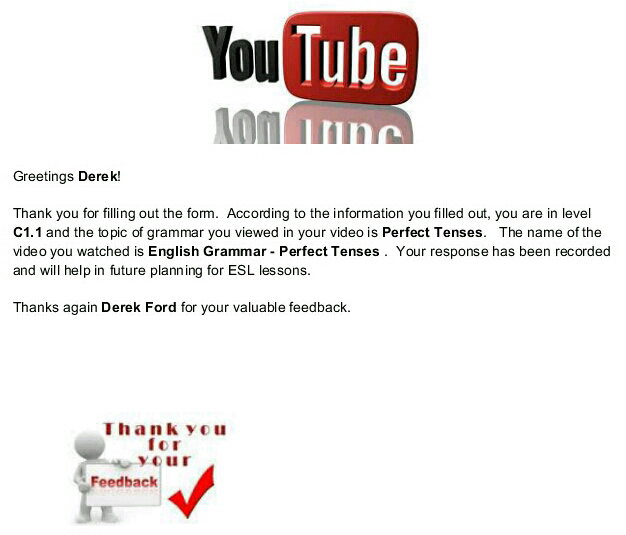
For example, this week I did a flipped class assignment and had my students give a YouTube Video Review on the assigned topic of Perfect Tenses of English. After filling out the form, I wanted to send my students an e mail confirmation resulting in a mail merge product. 

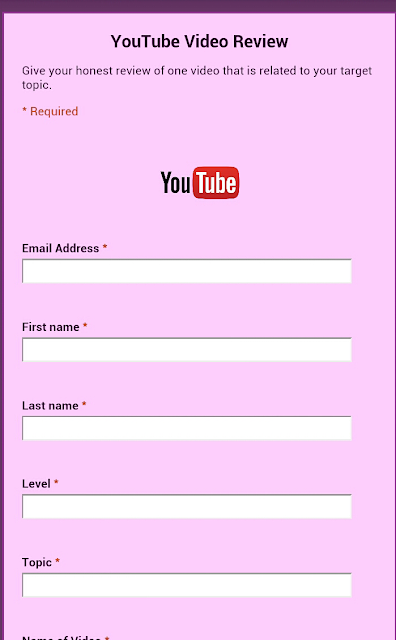
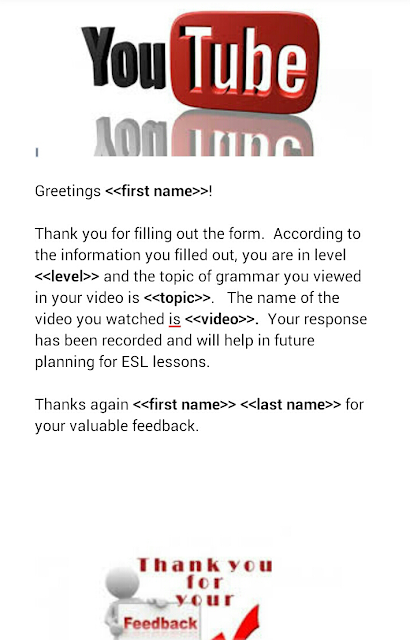
In their class blog, I pasted a link to a Google Form for reviewing a video (see below). Once the students completed the Form, I went to the response spreadsheet of that same Form and inserted Autocrat from the scripts gallery option.  Previously, I had created a shared document in Google Docs (see below) featuring carrots <<>> of where I wanted the information from the response spreadsheet to appear in their future mail merged confirmation. I also had to create folder for the final destniation storage of the final mail merged documents. After I ran Autocrat,  I checked my destination folder in Google Drive and found a mail merged copy of responses and the document I created for each Form submission by the student. Perfect!! Next, I emailed each student a copy their own individualized  email merged confirmation document.

I honestly feel that this script is probably more effective for administraation purposes versus classroom. I also understand that certain features that were available in the old Google spreadsheets, like automatically triggering return responses, are not available in the new Google spreadsheets so you will have to use an old sheets version if you want to have Google email the final mail merged documents to students without you having to do so.  To find out how to create your own mail merged document using autoCrat, check out this link to a video by Jesse Thorstad! http://youtu.be/xeRhzz4RuCA

Best,
#mrford#techsavvyteacher


My YouTube Video Review Form made in Google Forms


Shared document I created in Google Docs for mail merge

Final mail merged product via Autocrat

Sunday, April 6, 2014

Techsavvy Tips for BYOD (Bring Your Own Device)

There are literally hundreds of articles about BYOD in the classroom, so I thought I'd throw my hat in the ring and share my experiences with you. As a paperless educator, BYODs are the common core for my flipped ESL classrooms as they are already common use and practice in the business world both domestic and foreign.  Employees of big companies and adult learners carry their personal devices into the boardroom and the classroom.  BYODs were first shunned from big companies and businesses for the obvious lack of control and security issues, but as more and more companies are taking advantage of secured cloud storage; school systems public and private are beginning to accept the idea that students can be responsible for their own devices and conduct in the classroom. Though the most popular BYOD is the smart phone, laptops and even the handheld gaming console are also popular BYOD devices.

I first employed BYOD when I was expected to deliver quality ESL material to a large group of students with very little or no technology.  During my interview with my first ESL company, they boasted to me about their use of technology in their classrooms. They even showed me a room with a whiteboard and overhead projector; only to find out that was their ONLY room with a whiteboard and projector and you had to reserve the room a week in advance.  I also got tired of standing in long lines to use the crowded copy machine or have my printed documents disappear into thin air after I sent them to the printer.

Though I have successfully managed to flip my classroom by way of BYOD, it doesn't mean that I haven't been met with obstacles along the way.  I have been met with resistance by both administration and my own students when I first implemented using smart phones in class.  I had challenges trying to share information to all students with different devices.  Poor Internet connection always ruined my day. And you can only imagine how I felt when a student just forgot to bring their device to class.  

So if you are thinking about starting your own BYOD classroom, or already have started yours, here are a few tips I would like to share with you from my experience.


  1. Slowly impliment BYOD into class. Sure, your excited  about BYOD, but not everyone else is. You'll be suprised to see how your  admin, co workers, and students will show resistance towards BYOD.   You'll definatly want to be ready to answer a bunch of questions and face criticisms. Your best bet is to create a policy for BYOD in your classroom, register your students for a Google account if they don't already have one, and create a classroom circle for your students in your Google Hangouts account for sharing.  
  2. Create your own BYOD policy for your classroom. I'm very liberal with the use of BYOD in my classrooms, but establishing a policy for using BYOD, like a class syllabus, makes it clear and cut what is expected/tolerated of the students use of BYOD. If you don't already have one of your own, here is a link to a nice list of sample BYOD policies. 11 Sample Education BYOT Policies To Help You Create Your Own
  3. Use cross platform sharing applications. Cross platforms are ideal for sharing links, documents, audios, videos, and messaging. Apps for phones like Viber, Tango and Whatsapp are popular with smart phones, but not compatible with many pads, notebooks, and laptops.  Your best bet is to utilize Google. Not only is its messaging system, "Hangouts" available on Apple and Android products, you do not require your student's personal phone number to register. You simply use their Gmail address.
  4. Take advantage of cloud storage accounts. Once again, Google folks! Cloud storage systems like Google (Drive) and Dropbox allow your students to pull their work from any device and free themselves of hefty laptops and those easy to lose jump drives.  
  5. Don't be afraid to use social media. Social media outlets like FB, Twitter, YouTube, Blogger, and Glide are great tools for creative assignments and finding resources outside of the box. Use blogs as a place to display student writings.  Share or make YouTube videos to help students understand grammar points,  Have your students create a survey with their FB friends. Use Glide for a one-on-one video debate. Use Google Hangouts for a video conversation and then make it a YouTube video on your YouTube page. There are so many ways you can use Social Media in your BYOD classroom. Get creative. Here's a link to my current class blog via Blogger.  EF Atlanta B2.1
  6. Be ready for things to go wrong. With technology, things WILL go wrong. Sometimes,  emails won't get delivered. Some devices just won't be compatible no matter what you do.  Internet connection will be slow. And yes, some of your students will spend more time on their own social media sites rather than their classwork. Be prepared by using alternative resources, and if worse comes to worse, there's nothing wrong with making paper copies of resources before class starts if you can foresee the problem ahead of time. 
  7. Be consistent.  Start with one aspect of BYOD and stick with it.  The worst thing you can do to your class is start them out with the idea of BYOD and then two weeks later, bring them back to paper and pencil.  Pace yourself and stay consistent. You as the instructor are their key to success. No computer, smart phone, or Mobile device can replace the leadership of an instructor.
Best,
#mrford#techsavvyteacher


Thursday, December 19, 2013

Using Google Forms to Create Quizzes for Your ESL Classroom

I've been a paperless teacher for over a year now and I honestly can't tell you the last time I actually had to stand over a copy machine. Thanks to Google, myself and tech-savvy educators across the world have ditched the traditional paper based Microsoft Word and opted for cloud services.  For me, the transition was almost invisible. I didn't even notice I had become a paperless teacher.  Features inside of Google Drive such as: Docs, Presentations, Spreadsheets, Forms and the Chrome App Store with their easy integration and organization have made it easier for educators to create, share, and store information like never before without the need for printing papers or documents.

Such is the case with Google Forms. Over the last few months, Google Forms has been my most used app inside Google Drive, especially when designing interactive TOEFL quizzes to be delivered to students over their phones or tablets.  Most ESL teachers I come across have NO idea that Google Drive even exists.  They are still avid users of Microsoft Word and rarely touch a Word product other that MW and PowerPoint.  They still consider Google to be just a search engine. During my presentations at conferences all across Georgia, I can't tell you how many times I still hear educators with over 20 years experience in the classroom scream, "WOW" when I show them how to use Google Drive products in the classroom.

Google Forms is originally designed to execute questionnaires, inventories, and surveys, but can also be used to design classroom quizzes featuring images and YouTube videos.  Along with a very famous script known as Flubaroo, theses classroom quizzes quickly become self grading and scores are stored in spreadsheets and emailed to students within minutes.  I first discovered Forms when as a student life coordinator, I wanted to make a small questionnaire for students exiting the institution I worked for.  After playing around with it, I quickly discovered that Forms could be used as a replacement for multiple choice tests we administered to our students who took their level up moving tests.  Not only was my discovery very effective, it eliminated the use for our outdated scan tron machine and the expensive papers that were piling up in our storage room.

The best part of Forms in my opinion, is that it provides transparency between students and teachers as the answer sheet can be attached to the students' email reported scores.   I usually review the quizzes immediately after they are scored and the answer sheet helps make it easier for students to recognize their mistakes.


Forms comes with a nice amount of colorful themes for its templates and includes a question types such as; Text, Paragraph Text for longer answers, Multiple Choice, Check Boxes, and Choose from a List. To find out more about Google Forms, try it yourself today! Just go to your Google Drive and select Form from the 'Create Menu.'

#mrford#techsavvyteacher


Tuesday, April 30, 2013

APP ALERT!! ESL PODCAST


     Are you a student looking for a great way to enhance your ESL/EFL listening skills? Are you an ESL Instructor who needs a quick listening activity to fill that missing gap in your syllabus? Check out my good friends Dr. Jeff and Dr. Lucy out in LA. ESL Podcast is the leader in podcasting for ESL/EFL students and instructors. Their podcasts are among the most popular and readily available online and on NOW your smart phone! 


     A lot of people are unfamiliar with podcasting.  Podcasting is basically a recorded dialogue that is intended to help enhance listening and reading comprehension skills.  They rely on a large variety of topics and many of these podcasts contain videos. A short quiz is usually given or listeners are asked to write a brief summary following the listening to test their comprehension. 

     I currently use this app in my Level 5 course at my institute as an instructor.  After playing the podcast via my phone and speakers, I ususally distibute a self generated worksheet that asks seven to ten questions and a brief summary of the listening.  I also request that my students download the app so that they can read along the second time the podcast is played for revision.

     Go to your Google Play Store and download the app today.  Let me know how it works for you.


Best,
#mr.ford

Sunday, April 14, 2013

Paperless I-94s Starting April 30th!

Current I-94 will be replaced by Automated I-94 by May 21, 2013
 
     If you've ever used your passport then you know that an I-94 is that little white form that your flight attendant asks you to fill out about 15 minutes before you land in your designated country. For those who are 'Coming to America', it's basically a form for Homeland Security and the U.S. Government to receive general information about you and your purpose of entering the country; including your flight number and place you intend on staying while here. 
 
     By May 21st, all people who enter the U.S. through an active seaport or airport will receive Automated I-94s.
 
     Starting April 30th, your I-94 will be collected by the airlines prior to your departure.  If you should need to access your admission number you will be able to do so online at CBP.gov/I94. You will need your passport number, date of birth, name, country of citizenship, and class of admission. 

     For nonimmigrant students, their I-94 number is necessary to change nonimmigrant status to another visa status or for an extension of nonimmigrant status. For more information...

https://www.help.cbs.gov
www.cbp.gov/xp/cgov/travel

Best,
#mr.ford


Saturday, April 13, 2013

Saturday's Atlanta Arab Festival was a BLAST!


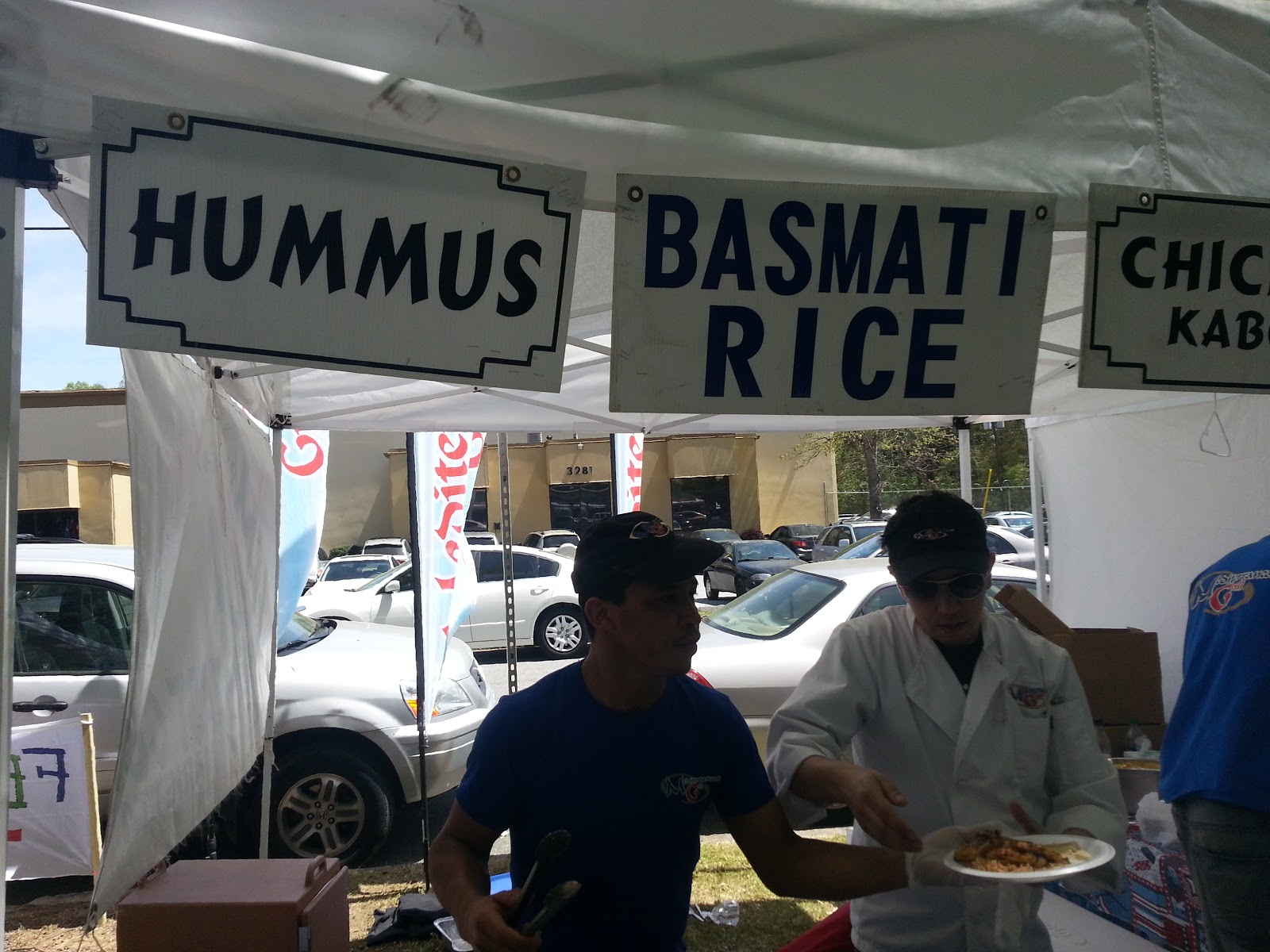
    This Saturday's 8th Annual Atlanta Arab Festival was a BLAST! I can't tell you how much I enjoyed myself.  I got a chance to enjoy some deeelicious food, a live concert, group dance, and conversation with members of the local Arab Community at Atlanta's Alif Institute.  I missed the Opening Flag Ceremony, but was just in time to listen to a little Oud Music and get my hands on some gyros, grilled chicken, pita bread and hummus dressing from Mediterranean Grill of Decatur, GA.  If you have never eaten at Mediterranean Grill, you have got to do yourself a favor and swing by one of their three Atlanta locations and thank me later.


    Moving on, the costume fashion show was very fun to watch.  There was no male clothing fashion, but the Arabic female clothing fashion models were very beautiful if I might say ;)! As the day went on, I ran across coworkers, students, FB friends, close friends I invited, and people who were in general very nice to me.  The live dance was exciting too. If you know me, you know I'll get a party started out of nowhere, so when someone gestured me to join in a circle dance, I didn't hesitate a second brothers and sisters. I jumped in with my friends and students trying to hold me back by the shoulders. "Mr. Ford come back--" they screamed. LOL.  Soon I was holding other peoples' hands and had Arabic rhythm under my feet.  Everybody was laughing and smiling as we all moved to the right in a big circle.  And just as I turned my neck to see where my 'crew' was, I had those same fools that were holding me back earlier dancing and clapping their hands too. It was Awesome, I did however have one moment where I suffered a little bit of a culture clash...

    I had brought my Saudi Arabian flag with me to the festival and kept it in my back pocket. During an intermission of one of the performances, I pulled my Saudi flag out of my pocket and waved it in the air. My students ran up to me and asked to take photos with it. Soon, I had like 12 people wanting to take a picture with the flag.  One person was a nice older Arabic lady who spoke no English.  She took the flag from me and gave me her phone to take a picture. After two snaps, a younger man who I assumed to be her son or nephew asked me in English to take a picture of him, the flag, and the old lady. After I snapped the photo with his phone I gave it back to him and he thanked me and gave me a hug. Cool. As I turn and give the old woman her phone, I reach out for a hand shake and she QUICKLY drew her hand from me and crossed her arms. For small second I felt embarrassed and looked down at the ground as if I was going to slam my head in the concrete and bury it there. I had forgotten that Arabic women are not permitted to touch men who are not family members. I apologized to both of them and told the English speaking sir that I meant no disrespect at all. He said Ok. I apologized to the gentleman again and told him that I was just one of those silly Americans who loves to go around hugging everybody he comes across when he's having a good time. He told me not to worry and that there was no harm done. Then he said, "Here," reaching out and giving me another hug. "I give you another one since you like hug so much." :)


     The market this year was much bigger than last year's and it was great to see some local ESL Institutes with their booths recruiting students.  BBT had a nice presence and so did Coca-Cola. There were all kinds of cloth, jewelry, oils, and artwork to buy from friendly faces. Henna and face painting were available for the kids. There was also a pony ride, moonwalker and two big plastic bubbles that were more or less oversized inflatable hamster wheels.    


    As the evening wined down and the white tents in the market started to fall apart, I took a tour of the inside of Alif Institute and took some photos of my favorite room inside the learning center. It's a shame that I only come here once a year I thought to myself. The volunteer tour guide was very friendly and permitted me to take photos so long as I didn't ask her to be in one. Inside there was everything from brass and wood cooking instruments to little dolls dressed in very rich and detailed clothing. 
  
    Around 6:20 in the evening, I finally called it quits and made my way to the parking lot with a couple of free t-shirts and other goodies.  A couple of people asked me if I would be back the next day and I told them that if I wasn't, then I would definetly return next year. 

    As I close, after 5 and half hours at the festival, I spent a total of $10; that includes the $2 admission fee. I also LOST $20 in change at the festival and it was found and returned to me 4 hours after I reported it missing.

     If you are ever in the International Village area of Atlanta and have a chance, swing by the Alif Institute and tell them #mr.ford sent you!

  Best,
#mr.ford

Alif Institute
3288 Marjan Drive
Atlanta, GA 30340
(770) 936-8770
www.alifinstitute.org
http://www.alifinstitute.org
Like them on Facebook:
ALIF Institute